Cookies and your Privacy
01344 874114
4,8,16,56 Alarm Inputs,GSM or Land Line Networks,No Need for a Fixed Line,Real Speech Messages,24hrs Battery Backup,Remote Interrogation,Fully Menu Driven,Call Back to Cancel, Analogue Inputs , Insurance Approved
Click Here to Contact us today to get the latest information and pricing

Recent Updates Page 25 Toggle Comment Threads | Keyboard Shortcuts

  • M60 Alarm Dialer 3:03 pm on June 26, 2012 Permalink |
    Tags: , ,   

    Recycle After Cancellation Autodialler Software Upgrade 

    The M30 Autodialler Recycle after Cancellation software upgrade provides the following additional feature to the standard M30.

    On a standard M30 when you cancel / acknowledge an alarm call the only way that the M30 will dial out again is if another becomes active or the current alarm goes and comes back again.

    But in critical applications some business owners managers might want to put in an extra layer of defense against accidental or malicious cancellation –  i.e. You receive the call during the night, cancel it,  then role over and go back to sleep.

    With this upgrade installed, if the alarm is still active X minutes after the M30 has been cancelled, the M30 will start dialing out again. Only when then the alarm has been cleared will you be able to do a full cancel.

    The software is currently available for nearly all 4, 8, 16 & 56 channel/input machines.

    As per all our software and hardware upgrades they can be customized to your exact needs.

    For more information please check out our Autodialler Optional Features page or Contact Us
     
  • M60 Alarm Dialer 12:18 pm on June 20, 2012 Permalink |
    Tags:   

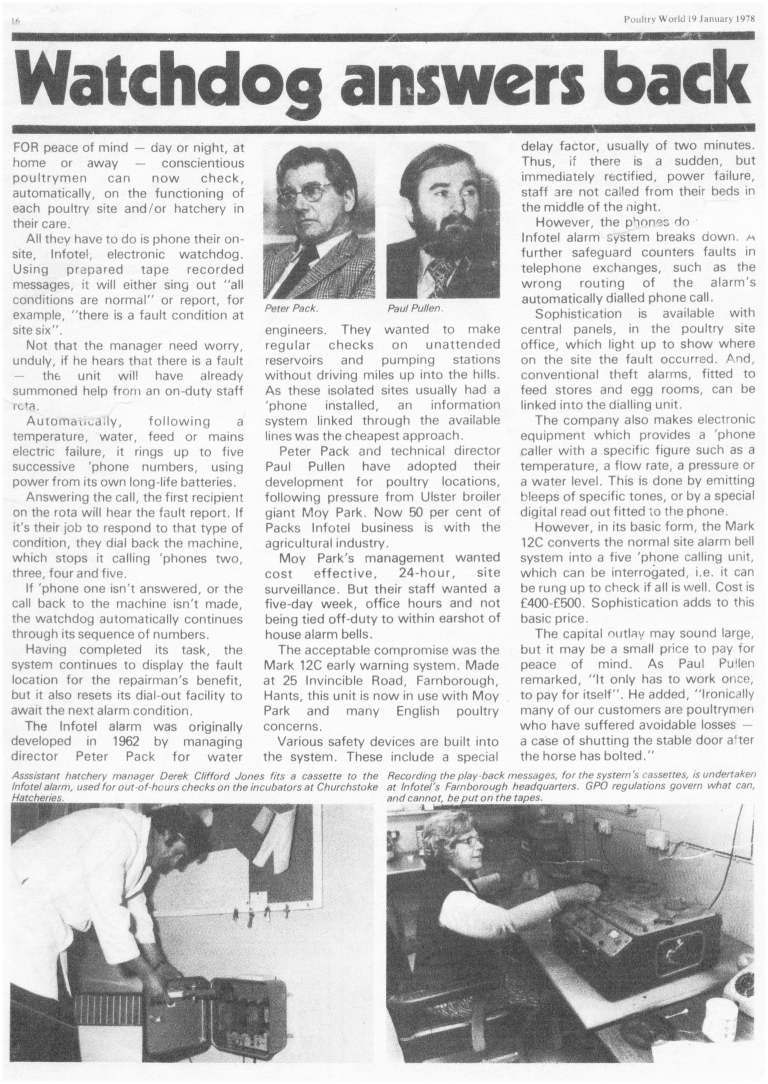
    1978 Article on the MK12c, a Predecessor to the M30 Autodialler 

    Below is an early article from the 1978 Poultry World magazine on the Mk12C automatic autodialler an early predecessor of the M30 Alarm dialer.

    This machine had its messages stored on 8 track tapes!!!!

    Article from 1978 about the mk12c Alarm dialler a predecessor to the M30

    Article from 1978 about the mk12c Alarm dialler a predecessor to the M30

     
  • M60 Alarm Dialer 12:11 pm on June 19, 2012 Permalink |  

    Channel to Roster Autodialler Software Upgrade 

    The M30 Autodialler Channel to Roster software provides the following additional feature to the standard M30.

    The upgrade allows each individual input/channel to call a separate dedicated list of telephone numbers when an alarm is activated, this in effect combines up to 16 separate Autodiallers into one single unit.

    This feature can be very helpfully when you have different people or departments that have responsibility for different alarms e.g. channel 1 might need to call security and channel 2 might need to call the maintenance department.

    A lot of people use this feature to fit the M30 to Fire Alarm panels in shared premises, so when a fire zone is activated the M30 only phones the company/people associated with that zone.

    As per a standard M30, each roster (dial out list) can hold up to 5 separate numbers – This is upgradeable.

    The software is currently available for nearly all 4, 8 & 16 channel/input machines.

    As per all our software and hardware upgrades they can be customized to your exact needs.

    For more information please check out our Autodialler Optional Features page or Contact Us
     
  • M60 Alarm Dialer 3:10 pm on June 11, 2012 Permalink |
    Tags:   

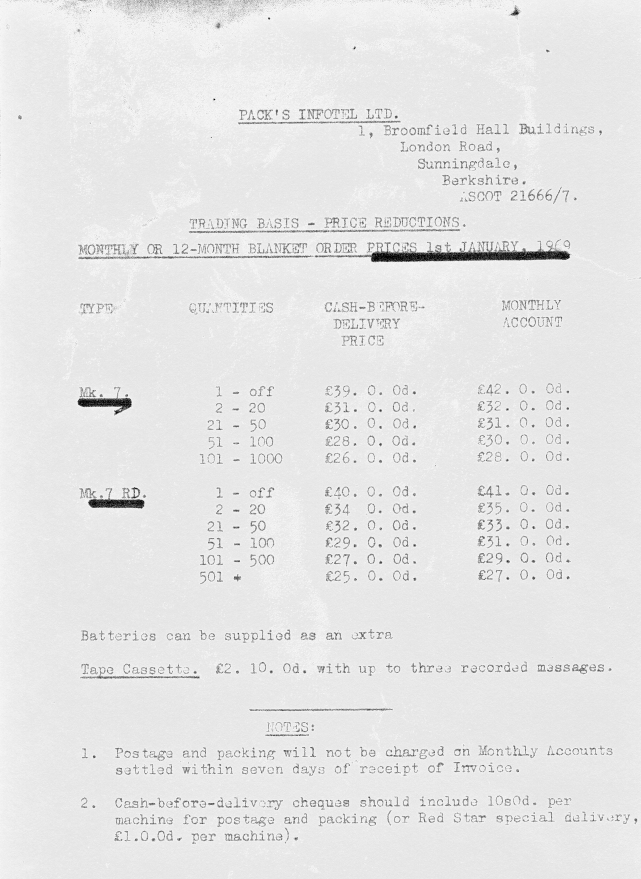
    1969 Prices of Early Alarm Dialers 

    Prices from 1969 of some of the early Alarm Dialers we manufactured the Mk7 & Mk 7 RD.

    Yours from only £25.0.0d !!

    Prices from 1969 of some of the early Alarm Dialers we Manufactured

    Prices from 1969 of some of the early Alarm Dialers we Manufactured

     
  • M60 Alarm Dialer 3:34 pm on June 8, 2012 Permalink |  

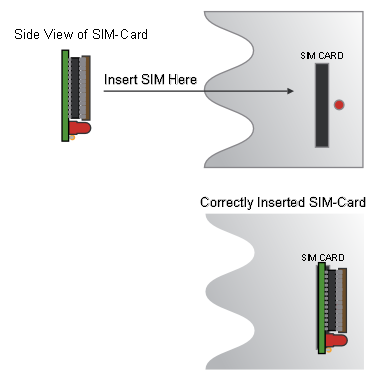
    How to Change the Sim Card on your M30 Alarm Dialer 

    Changing the M30 Alarm Dialer  SIM-Card.

    You cannot simply pull out your existing SIM-Card, and insert the new SIM-
    Card. Please follow carefully the instructions below.
    1.    Press ‘M’ on the keypad, the message [Change Roster] will be seen.
    2.    Press ‘N’ on the keypad, the message [Change SIM-Card] will be seen.
    3.    Press ‘Y’ for Yes.
    4.    The M30 will ask ‘REMOVE EXISTING CARD’.
    5.    Remove the SIM-Card from the M30.
    6.    The M30 will respond with ‘INSERT NEW CARD’
    7.    Insert the new SIM-Card.
    8.    Press the ‘Y’ key once the new SIM-Card has been inserted.
    The M30 will now start loading information from the new SIM-Card.


(c) Copyright 2000 - 2026 Industrial GSM Alarm Dialer

Click Here to Contact us today

Return to the M60 Home Page


1 Broomfield hall buildings, London road, Sunningdale, Ascot, Berkshire, SL5 0DP, United Kingdom.
 Tel +44 (0)1344 874114 Fax +44 (0)1344 874664

[M60 Autodialer] [Standard Features] [Optional Features] [What is a Alarm Autodialer] [M60 Expander] [GSM Dialler Module]
[
SMS Alarm Messages] [Analogues & Data Logging] [Line Sensing] [Central Station] [M60 Alarm Splitter] [M60 Online Blog]
[
Autodialler Comparison] [Autodialler Applications] [Poultry Alarm System] [Power Station Autodialer] [Building Management Autodialler]
 [
Autodialler Gas & Oil] [Refrigeration & Storage Autodialer] [Land fill Autodialler] [Waste Water Autodialler]
[
Flood Warning Autodialler] [Livestock Autodialler] [Horticulture Autodialler] [SCADA Autodialer] 
[
M60 Data sheets] [M60 Photo Gallery] [Contact Us] [Sitemap] [Cookies]

A Packs Infotel Designed Product

Guildford Website Design

c
Compose new post
j
Next post/Next comment
k
Previous post/Previous comment
r
Reply
e
Edit
o
Show/Hide comments
t
Go to top
l
Go to login
h
Show/Hide help
shift + esc
Cancel