











Cookies and your Privacy
01344 874114
4,8,16,56 Alarm Inputs,GSM or Land Line Networks,No Need for a Fixed Line,Real Speech Messages,24hrs Battery Backup,Remote Interrogation,Fully Menu Driven,Call Back to Cancel, Analogue Inputs , Insurance Approved
Click Here to Contact us today to get the latest information and pricing

Updates from March, 2013 Toggle Comment Threads | Keyboard Shortcuts

  • M60 Alarm Dialer 2:14 pm on March 14, 2013 Permalink |
    Tags: , , , , , , , , , , , , ,   

    SMS Text Message Feature 

    SMS Text Message Feature

    As of the winter of 2012/13 we have added another new feature to our M30 Alarm Dialler, the ability to send SMS messages in addition to the standard voice messages.
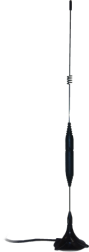
    SMS Text Message Feature

    Each input/channel on the M30 can be configured with a user defined text message of around 25 ASCII characters – so instead of a recipient getting a useless “channel 1” alarm they can receive a useful “Mains Failure Boiler one” message.

    This feature is in addition to the standard voice message option so you can still setup and send user recordable voice messages over the PSTN networks or over the GSM networks with the GSM converter.


    Setup

    Setting up your M30 is very simple; while entering your alarm contacts phone numbers you can select whether the recipient should get a SMS or a voice message.SMS Text Message Display
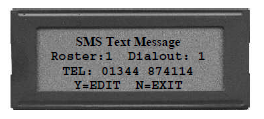
    The station identification is a maximum of 31 ASCII Characters.

    All inputs can have an individual identifying text message of up to 25 ASCII characters.


    Operation

    When the M30 detects an active alarm/s it will send an individual SMS message for each active input to the predefined recipients. E.g. if 4 inputs are active then the on call engineer would get 4 SMS’s.


    Message Example

    Each SMS message is created from the M30’s Station ID (in <> brackets) and the inputs individual message and then followed by an *End of Message*.

    E.g. If channel 1 is in alarm the M30 will send a text message as follows:SMS Text Message
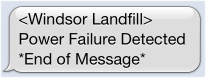
    <Packs Infotel Office> Channel 1 Alarm Condition *End of Message*

    or

    <Sunningdale Landfill> Mains Failure Boiler one *End of Message*

    For more information of the SMS upgrade visit the SMS Feature page or the SMS section on our Blog.

     
  • M60 Alarm Dialer 12:30 pm on October 22, 2012 Permalink |
    Tags: , ,   

    How to turn off the answer machine on your mobile phone sim card 

    If you are putting  a mobile phone sim card into a GSM Autodialler you must first disable the Answer Phone otherwise you when ever you try to interrogate the GSM Autodialler or cancel it you will get the answer phone rather than the Autodialler.

    Vodaphone

    • To turn the answer phone off:
    • Dial 1210 and press send.
    • To turn the answer phone on:
    • Dial 1211 and press send.

    Orange

    • To turn the answer phone off or on:
    • Contact customer services on 150 ask them to turn it on or off.
    • Some handsets allow you to adjust the settings from the menus.

    O2

    • To turn the answer phone off:
    • Dial 1760 and press send.
    • To turn the answer phone on:
    • Dial 1750 and press send.

    3

    • To turn the answer phone off or on:
    • Contact customer services on 1913 ask them to turn it on or off.
    • Some handsets allow you to adjust the settings from the menus.

    For more information or help contact us or visit the GSM or SMS Page

     
  • M60 Alarm Dialer 3:38 pm on September 26, 2012 Permalink |
    Tags: , , , ,   

    What advantages does the SMS Autodialler Module Give me? 

    What advantages does the SMS Autodialler Module Give me?

    The module uses the GSM networks rather than the land line networks to send SMS messages, so it acts as an automatic line backup incase the lanSMS Autodiallerd line has failed, is in use or has been cut.
    As the module allows you to select whether you would like the recipient to receive a voice or SMS message it creates a much more flexible system, with uses outside of the standard communication of alarms.
    For Example;

    • Keep a permanent record of all onsite alarms.
    • Integrate an onsite pager system.
    • Setup channels to “Alert” rather than “Alarm”.
    • Visual alarm messages for the deaf or hard of hearing.


    The SMS Upgrade Module is “quad band” meaning it will work in Europe and also most of North & South America Plus  Africa  and Australasia.

    For more information please contact us or visit the SMS Module page.

     
  • M60 Alarm Dialer 11:30 am on August 31, 2012 Permalink |
    Tags: , , , , ,   

    Wireless Alarm Autodialler 

    Wireless Alarm Autodialler


    Sometimes it can be more convenient to have a Wireless Alarm Autodialler instead of a wired one connected to the PSTN networks. Our Wireless Autodialler uses the GSM mobile networks in order to send and receive alarm messages.

    Wireless systems do have a number of advantages over a standard wired system;

    • Where it is not possible to get a PSTN landline installed.
    • Where the cost is prohibitive to get a landline installed.
    • Can be used in a temporary installation.
    • Can be used where the item being monitored is regularly moved.
    • Where there is high risk that a land line might fail either because of nature or due to malicious damage.


    We offer two different types of wireless system;

    GSM Dialler Converter Module

    This module allows you to have the best of both worlds, you can either just use the GSM wireless networks to send real speech voice alarm messages or switch to them if the land line fails or is cut.

    SMS Module

    This module allows you send SMS text messages alerting your on call personal there is a problem on site.


    When opting for a wireless system instead of a wired system you do need to be aware they are not typically as reliable as a landline PSTN system. The GSM networks do not have the same operating capacity as PSTN phone networks. That is why at peak times e.g. New Year you cannot get a call out. Governments also have the right to shut down the GSM networks in times of national emergency or when they are performing sensitive operations.

    The GSM networks are also more susceptible to being disrupted by local electrical interference.


    For more information please Contact Us or visit our GSM Dialler Module page or our SMS Alarm Dialler Page

     
  • M60 Alarm Dialer 11:32 am on August 13, 2012 Permalink |
    Tags: , , , , , , , ,   

    What is a GSM Alarm Dialler? 

    What is a GSM Alarm Dialler?

    GSM Alarm Diallers are fairly new to the market (i.e. the last 8 years or so) but in that time have shown themselves to be very useful and convenient either as an alternative to a standard Alarm Dialler or as a backup device.

    In situations where it is not practically or financially viable to get a land line installed or where there is a high chance someone might try to block the line a GSM Dialler can be ideal.

    A GSM Alarm Dialler is essentially the same as Landline Version but accepts a sim card and uses the GSM networks to make and receive alarm calls rather than PSTN land lines.

    Not all GSM Diallers are equal most are very cheap and are not designed to cope with commercial or industrial use, nor will they have the features a business might require i.e. multiple dial out lists for different staff rotas. For example the Commercial M30 Autodialler by Packs Infotel can use both Landlines and the GSM network, i.e. The M30 can use the GSM networks all the time or the M30 can use the Land Line networks and only switch to the GSM / Mobile networks if the land line fails.


    But you do need to be bare in mind that GSM / Mobile networks are typically less reliable than a fixed land line, as they are more susceptible to weather and local conditions and have a smaller network capacity. E.g. during peak times the mobile networks often become clogged and fall over. Governments also have the power to turn off or disrupt the GSM and or Mobile networks in an emergency.

    Because of this if you application is critical we would recommend where ever possible to use a land line as the primary medium and use the GSM networks as a backup.


    For more information visit the M30 GSM Autodialler Page,  GSM Module Page or Contact Us


(c) Copyright 2000 - 2026 Industrial GSM Alarm Dialer

Click Here to Contact us today

Return to the M60 Home Page


1 Broomfield hall buildings, London road, Sunningdale, Ascot, Berkshire, SL5 0DP, United Kingdom.
 Tel +44 (0)1344 874114 Fax +44 (0)1344 874664

[M60 Autodialer] [Standard Features] [Optional Features] [What is a Alarm Autodialer] [M60 Expander] [GSM Dialler Module]
[
SMS Alarm Messages] [Analogues & Data Logging] [Line Sensing] [Central Station] [M60 Alarm Splitter] [M60 Online Blog]
[
Autodialler Comparison] [Autodialler Applications] [Poultry Alarm System] [Power Station Autodialer] [Building Management Autodialler]
 [
Autodialler Gas & Oil] [Refrigeration & Storage Autodialer] [Land fill Autodialler] [Waste Water Autodialler]
[
Flood Warning Autodialler] [Livestock Autodialler] [Horticulture Autodialler] [SCADA Autodialer] 
[
M60 Data sheets] [M60 Photo Gallery] [Contact Us] [Sitemap] [Cookies]

A Packs Infotel Designed Product

Guildford Website Design

c
Compose new post
j
Next post/Next comment
k
Previous post/Previous comment
r
Reply
e
Edit
o
Show/Hide comments
t
Go to top
l
Go to login
h
Show/Hide help
shift + esc
Cancel