Cookies and your Privacy
01344 874114
4,8,16,56 Alarm Inputs,GSM or Land Line Networks,No Need for a Fixed Line,Real Speech Messages,24hrs Battery Backup,Remote Interrogation,Fully Menu Driven,Call Back to Cancel, Analogue Inputs , Insurance Approved
Click Here to Contact us today to get the latest information and pricing

Updates from July, 2017 Toggle Comment Threads | Keyboard Shortcuts

  • M60 Alarm Dialer 12:34 pm on July 6, 2017 Permalink |
    Tags: ,   

    The M60 Alarm Dialler Has Just Been Released! 

    The M60 Alarm Dialler Has Just Been Released!

    The M60 Alarm Dialler has just been released! This is a direct replacement for our popular M30 “Ultimate” Alarm Dialler that has been in production since the early 2000’s. The M60 is now the 10th different model of Alarm Diallers we have produced since our company’s inception in 1958.M60 Alarm Dialler
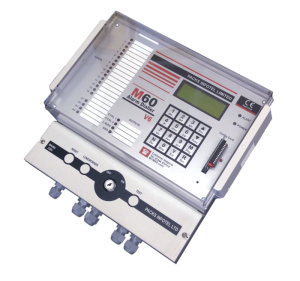
    The M60 was created to give our customers the most advanced & modern Alarm Dialler system possible. We asked our customers what they would like to see on our next version and we have done our best to integrate the requested new features or offer them as optional extras.

    On top of all the standard features you would expect on an Alarm Dialler, the M60 now offers the below features;

    • Protected number storage.
      • The M60 now stores its numbers in its permanent storage, so it will not lose them even if the power is removed for years at a time.
    • Cut-out termination plate
      • The M60 now comes with a screen printed termination plate to allow reset and test buttons to be easily fitted either as standard or as a retro fit by a customer.
    • SMS
      • The M60 now gives the option to send SMS alarm text messages on top of or instead of standard voice communication.
    • GSM
      • The M60 now offers a full time mobile/cell phone connection if there is no land line present or the M60 can automatically swap over to it as backup facility if the landline fails.
    • Integrated lone worker (Optional Extra)
      • The M60 now allows you to have an integrated Lone Worker system. The M60 Lone Worker once activated requires a lone worker to press a local or remote button every x seconds, if they fail to do so it will issue a warning and then send an alert out to the on call personal.
    • Control Outputs (Optional Extra)
      • The integrated switched outputs can be set up to turn items on or off during certain occurrences or remotely via the phone line.
    • CTR (Optional Extra)
      • With the M60 each individual input/channel can have its own dedicated list of alarm contact numbers. This means that for example channel 1 could phone the fire brigade and channel 2 could phone the on call engineer.
    • Analogues (Optional Extra)
      • The M60 can have up to 4 Analogue signals connected; this can also be used with data logging.
    • Timed Roster (Optional Extra)
      • The Timed Roster option allows you to automatically switch between your rosters at certain times of the day/week. E.g. you might have a Day Roster, Night Roster and Weekend Roster.
    • Integrated ADSL/Fibre phone filter (Coming Soon)
      • The M60’s LIM board will have an integrated filter fitted so you can easily have ADSL or fibre on the same phone line without any interference.


    If you would like more information on our new M60 or our current price list then please Contact Us Today.

    Related Articles:

    Written by

     
  • M60 Alarm Dialer 12:06 pm on April 14, 2014 Permalink |
    Tags: , , , , , , , , V50 software   

    New V50 software released for the M30 Alarm Dialer 

    New V50 software released for the M30 Alarm Dialer

    The new V50 software version has many new features and improvements, but the main changes are listed below.

    New V50 software released for the M30 Alarm Dialer

    New V50 software released for the M30 Alarm Dialer

    Keypad

    The M30 will now automatically progress to the next slot after a phone number has been added or edited.

    The only exception is if it is already at the last slot in that roster/group.

    Delays

    All Dial out delays on the M30 can now be skipped over/though by simply pressing the “ESC” key.

    This includes the Input delay, Inter-dial out delay and the Extended pause delay.

    Number Skip Dial out Feature

    The M30 now gives you the ability to manually select the number to be dialed from the currently selected roster.

    For example during your weekly tests you don’t want to disturb the person in Dial out 2 as they are on holiday, with this feature you can just skip over them and jump straight Dial out 3.

    When “TEL” appears on the display press the “ESC” key and you will hear a small beep. You can now use the down arrow to cycle though all the Dial out slots in the currently selected roster. (Every time you press the down arrow you will see the Dial out slot number change.)

    If you go too far just keep pressing the down arrow, and the M30 will loop around.

    When you are happy press the “ESC” key again and the M30 will carry on from the chosen number.


    For more information and pricing on the V50 Software Upgrade please contact us

    Related Articles:

    Written by

     
  • M60 Alarm Dialer 2:38 pm on November 19, 2013 Permalink |
    Tags: , , , , , , , , , , , , ,   

    CTR Channel to Roster Software Upgrade 

     CTR Channel to Roster Software Upgrade

    On a Standard M30 on when dialing it will select the Duty Roster set by the User (1,2 or 3). The current Duty Roster selected is shown on the top right of the LCD display (e.g. R1, R2, R3).

    CTR Channel to Roster Software Upgrade

    CTR Channel to Roster Software Upgrade


    The Channel to Roster software works differently. When an alarm becomes active, instead of the M30 dialling out on one of the Duty Rosters, the M30 will automatically select a Roster linked to that alarm channel.

    So for Example;

    If Channel 1 is activated it will dial Roster 1.

    If Channel 5 is activated it will dial Roster 5.

    If Channel 10 is activated it will dial Roster 10 etc.

    This software upgrade is great for when you need to communicate different alarms to different people for example the fire brigade for the fire alarm and the maintenance department for the Air Conditioning in the server room.

    This new feature is available either as an option on a new M30 or as a simple software upgrade on a current machine.

    For more information and pricing on the C2R Software Upgrade please contact us

    Related Articles:

    Written by

     
  • M60 Alarm Dialer 2:41 pm on April 2, 2013 Permalink |
    Tags: , , , , , , , , , ,   

    GSM Alarm Dialler 

    GSM Alarm Dialler with Voice and SMS

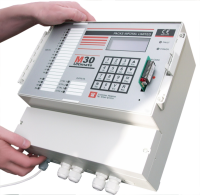
    GSMThe M30 GSM Alarm Dialler is an industrial / commercial unit designed for operating in harsh environments. The M30 comes with all the features you would expect from an industrial unit including; 4 to 56 independent inputs each with their own user recordable speech or SMS message and integrated 24+ hour battery backup  to name a few –  see the standard features page for a full list.

    Speech & SMS

    The M30 Dialler now supports both Speech and SMS alarm messages. This can be individually configured for each Dialout. E.g. Dialout 1 to send a speech message to a land line, Dialout 2 to send a speech message to a mobile and Dialout 3 to send an SMS to a mobile.

    GSM & PSTN

    Unlike all other GSM Alarm diallers the M30 also has a PSTN connection, meaning if you wish, you can setup your unit to use the GSM network as a backup connection. I.e. The M30 will monitor your PSTN land line; if it fails or is cut it will automatically switch to the GSM network.


    Below is a small subsection of the features that are available on the M30;

    • 4,8,16 & 56 Individual Alarm Inputs.GSM Alarm Dialler
    • Individual Speech Messages for each input.
    • Individual SMS Messages for each input.
    • PSTN & GSM Options.
    • Internal Mains Failure Alarm Sensor.
    • 24+ Hour Internal Battery Backup.
    • Fully Menu and Keypad Driven.
    • IP56 Industrial Rated Enclosure.

    If you would like more information or help on the features of the M30 please visit the standard or optional features pages or contact us directly.

    The M30 is designed and built by us in the UK so if there are any special features you require for your application, we will normally be happy to create them for you.

     If you have any questions or would like pricing please contact us.


    Related Articles:

    Written by

     
  • M60 Alarm Dialer 10:13 am on March 19, 2013 Permalink |
    Tags: , , , , , , , , , , , , ,   

    SMS Dialler 

    SMS Dialler

    The Packs Infotel M30 SMS Dialler is a purpose built and designed machine for the types of harsh environments typically found in industrial and commercial applications.

    THe M30 comes with 4,8,16 or 56 individual inputs as well as all the standard features you would expect from an industrial SMS Dialler including  24 hour battery backup.

    The M30 is used all over the world in a diverse collection of applications such as Pharmaceutical, Power Generation, Security, Cold Storage, Oil / Gas Refineries, Building Management, Food production, Industrial Process Monitoring as well as the protection of humans and livestock.


    SMS Text Messages

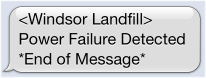
    Each individual input of the M30 from 4 to 56 inputs has its own SMS message that is user configurable to about 25 ASCII characters plus each M30 has a station identification, this gives you an easy way to identify from which machine the SMS arrived.SMS Dialler Text Message

    When the M30 goes into alarm and sends the SMS messages to the predefined contact list the end user will receive an individual text message for each input/channel that is in alarm. So for instance if inputs/channels 1, 2, 3 and 4 were active the recipient would get four SMS messages.


    SMS and or Real Speech Messages over PSTN or GSM networks.

    The M30 is unique as it allows you the flexibility of not just sending SMS messages but voice messages as well.

    With the M30 you can also send user recordable real speech voice messages over a connected PSTN land line connection or with an optional module send them over the GSM networks as well.


    The SMS Dialler version of the M30 comes with the same standard features such as

    • 4, 8, 16 or 56 independent alarm inputs.
    • 3 separate Rosters (dial out lists).SMS Dialler
    • SMS and or Real Speech Messages over PSTN or GSM networks.
    • Integrated battery backup.
    • Integrated Mains Failure.
    • Integrated Alarm output.
    • Fully Menu and keypad driven.
    • Industry standard IP56 enclosure.


    The above list is not definitive, also as the M30 is designed and built by ourselves in the UK if there is a feature or function you need for your particular applications then please let us know as we can normally create it for you.


    For more information or pricing on our M30 Auto Dialer please contact us or visit the SMS Dialler page on our site.


    There is also a now a dedicated SMS section on our Blog.


    Related Articles:

    Written by


(c) Copyright 2000 - 2025 Industrial GSM Alarm Dialer

Click Here to Contact us today

Return to the M60 Home Page


1 Broomfield hall buildings, London road, Sunningdale, Ascot, Berkshire, SL5 0DP, United Kingdom.
 Tel +44 (0)1344 874114 Fax +44 (0)1344 874664

[M60 Autodialer] [Standard Features] [Optional Features] [What is a Alarm Autodialer] [M60 Expander] [GSM Dialler Module]
[
SMS Alarm Messages] [Analogues & Data Logging] [Line Sensing] [Central Station] [M60 Alarm Splitter] [M60 Online Blog]
[
Autodialler Comparison] [Autodialler Applications] [Poultry Alarm System] [Power Station Autodialer] [Building Management Autodialler]
 [
Autodialler Gas & Oil] [Refrigeration & Storage Autodialer] [Land fill Autodialler] [Waste Water Autodialler]
[
Flood Warning Autodialler] [Livestock Autodialler] [Horticulture Autodialler] [SCADA Autodialer
[
M60 Data sheets] [M60 Photo Gallery] [Contact Us] [Sitemap] [Cookies]

A Packs Infotel Designed Product

Guildford Website Design

c
Compose new post
j
Next post/Next comment
k
Previous post/Previous comment
r
Reply
e
Edit
o
Show/Hide comments
t
Go to top
l
Go to login
h
Show/Hide help
shift + esc
Cancel